
Home / Payment → Accounting / Nets Easy → e-conomic
Nets Easy to e-conomic
Every Nets Easy payout in a journal in e-conomic — sales, refunds and Nets Easy's fees through a clearing account, so the bank line matches the payout.
About this app
2app reads every payout from Nets Easy and puts it in a journal in e-conomic: sales, refunds and Nets Easy's fees, each on the day it happened, and the payout itself on the day the money reached the bank. Everything goes through a clearing account (Nets Easy receivable), which returns to zero, so the bank line matches the payout exactly.
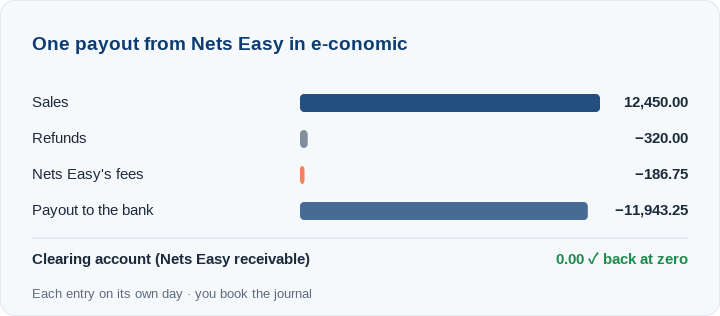
What gets posted from Nets Easy in e-conomic?
- Sales and refunds
- Nets Easy's fees (with a VAT code if you want one)
- The payout to the bank
How to connect Nets Easy to e-conomic
Log in with e-conomic, connect Nets Easy with a secret key with read access to Nexi's Report API, and choose the journal and accounts — 2app proposes them from your chart of accounts. You choose whether the payout is the sale (revenue with VAT on the day of the sale), or the sales are already invoiced in e-conomic — then each payment closes the invoice for its order. Every payout is fetched automatically and put in the journal; you book it. A payout that does not add up to the øre is stopped and shown — never posted with a difference.
Example: one Nets Easy payout in the daybook
Nets Easy pays out DKK 2,871.09 for 3 payments. The orders are already invoices in e-conomic, so each payment closes its invoice as a customer payment. 2app puts these entries in the daybook:
| Entry | Debit | Credit | Amount |
|---|---|---|---|
| Payment, order 1187 | Nets Easy receivable | Debtor (invoice 1187) | 488.00 |
| Payment, order XKBKNABJK | Nets Easy receivable | Debtor (invoice XKBKNABJK) | 541.00 |
| Payment, order 1201 | Nets Easy receivable | Debtor (invoice 1201) | 1,890.00 |
| Fees | Fees | Nets Easy receivable | 47.91 |
| Payout | Bank | Nets Easy receivable | 2,871.09 |
The clearing account (Nets Easy receivable) takes 2,919.00 in and the same out again. It stands at zero, each invoice is paid, and the bank line of 2,871.09 matches the payout exactly. Nothing is booked on a sales account, as the invoice has counted the sale already.
Two ways to book Nets Easy
- You invoice every order in e-conomic (with 2app's webshop integration, say): each payment closes its invoice, found by the order number. A payment up to DKK 1.00 off goes to an account for rounding differences; more than that stops the payout. If an invoice is not booked yet, the payout waits and is tried again every hour.
- You do not invoice the orders: each payout is booked as totals per day. You choose whether the payout is the sale (revenue with VAT on the day of sale), or the sale is already invoiced elsewhere (a balance account without VAT, which your bookkeeper settles).
2app suggests the right one from your latest payout and shows you its entries before anything is saved. 2app reads the payouts through the Nexis Report API with a key that may only read.
Fees and VAT
Nets Easy's fees are booked on your fee account, apart from the sales, with the VAT code you choose, or without VAT, which is usual for fees on payments. You see what payments cost, and the bank line is still the whole payout.
Currencies, disputes and the first day
- A payout in another currency than the books is booked in its own currency at Danmarks Nationalbank's rate on the payout's day, on its own bank and clearing account.
- Disputes and reversals can get their own account.
- Movements 2app knows no account for are never booked on a guess; the payout stops and is shown.
- You choose a first day. Payouts that reached the bank before it are in your books already and are not booked again.
- One voucher a day or one per payout. A voucher is split only where an accounting year ends.
With your webshop
When the orders become invoices in e-conomic with WooCommerce to e-conomic, PrestaShop to e-conomic, Magento 2 to e-conomic, each Nets Easy payment can close its own invoice. Your debtors then come to zero, without anyone reconciling by hand.
Connect Nets Easy and try the settings on your latest payout; the entries are shown before anything goes into the daybook. The trial runs from the day you connect, and you can stop at any time.
What it looks like in 2app


Examples from 2app with test data.
Questions about Nets Easy to e-conomic
How are Nets Easy payouts booked in e-conomic?
Each payout goes into a daybook: sales, refunds and Nets Easy's fees on the day they happened, and the payout itself on the day the money reached the bank. Everything goes through a clearing account (Nets Easy receivable), so the bank line matches the payout.
Can Nets Easy payments close invoices already in e-conomic?
Yes. You choose whether the payout is the sale (revenue with VAT on the day of sale), or the sale is already invoiced in e-conomic — then each payment closes the invoice for its order.
What do I need to connect Nets Easy?
A login to e-conomic and a secret key with read access to the Nexis Report API.
Does 2app book the entries?
No. 2app puts the entries in a daybook in e-conomic, and you book them yourselves. A payout that does not add up to the øre is stopped and shown — never put in the daybook with a difference.
How long does setup take?
Most are running the same day: log in with e-conomic, connect, and see the first entries before anything is sent. If you get stuck, we help — directly in your setup too, if you give us support access.
Is my data safe?
2app only gets read access to your webshop or payment provider. The keys are stored encrypted and never shown again, and you can delete them at the provider at any time to cut 2app off.
Can I cancel?
No lock-in. Stop after the trial if it is not a fit.
Self-service or assisted?
Self-service: each step in the dashboard shows where to find what it needs. If you would rather have help, call or write — we can set the app up with you.