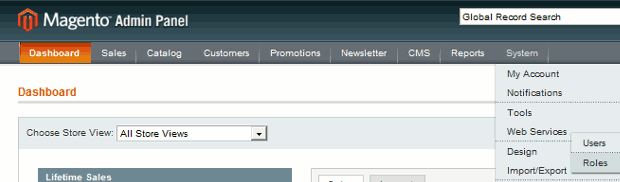
- Log into Magento Admin CMS
First, you have to add API role. Login to the Magento Admin CMS and navigate to System > Web Services > Soap Users
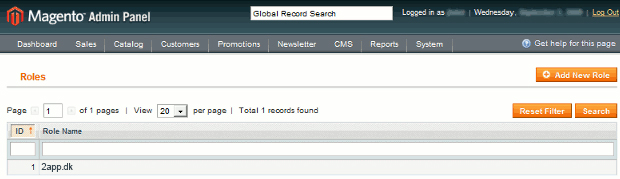
- Create new API role
This page lists the current API roles. If there none listed yet, click on Add New Role.
Every role needs a name. This can be anything. Just make sure it is descriptive enough for yourself.

The second tab on the left (Role Resources) allows you to select which resources should be available for users with this role. Although you can select exactly which privileges are given, it is recommend that you should select All unless you're willing to learn more about Magento.

- Create new API user
Now that the role is created, you can add an user who has this role.
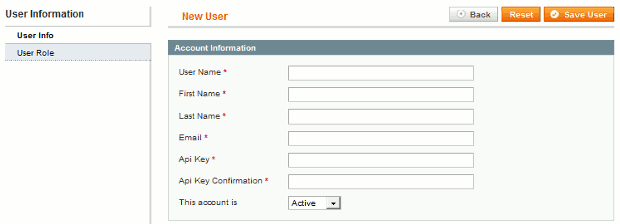
First Name, Last Name and Email have to be filled in with any value you want. Make sure the User Name and Api Key are secure enough.

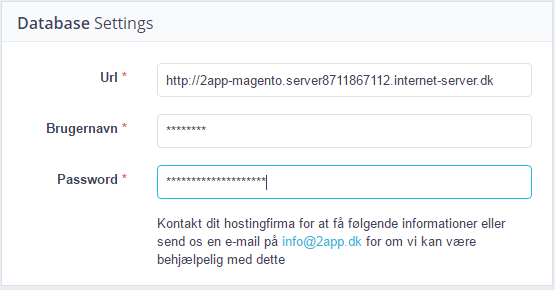
- Configure API details in 2app dashboard
User Name and Api Key of the user that is created in Magento, need to be configured inside the 2app settings in dasboard. Login to the Dashboard Administration and navigate to Webshop on left column. Enter the user details in the fieldset of Database Settings.