
Home / Webshop → Accounting / Magento 2 → e-conomic
Magento 2 to e-conomic
Every Magento 2 order as an invoice in e-conomic — checked to the øre against what the customer paid, before anything is sent.
About this app
2app reads the orders from Magento 2 and makes a draft invoice in e-conomic for each: the customer, the product lines, shipping, discount and VAT. You see each invoice first, worked out and set against what the customer paid — to the øre. Only once you have looked at the first ones does 2app send on its own.
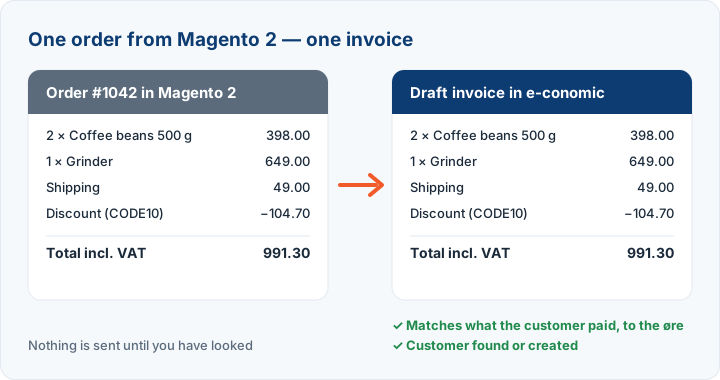
What goes from Magento 2 to e-conomic?
- Orders as draft invoices — or booked and sent to the customer, when you choose
- Customers found or created in e-conomic
- Product lines by item number, shipping and discounts
- VAT per country, One-Stop-Shop (OSS) included
- Refunds as credit notes
How to connect Magento 2 to e-conomic
Log in with e-conomic and connect Magento 2: Create an integration in Magento with read access to orders, customers and products, and paste its four keys. 2app only reads. Choose when an order comes along (paid or shipped, say), and look at the first invoices in e-conomic. Then you can switch on automatic sending — with a daily limit, and it stops itself if something goes wrong.
Example: order 000000318 from Magento 2 as an invoice in e-conomic
A customer in Denmark pays DKK 1,238.75 including VAT and shipping in your Magento 2 shop. 2app makes this draft invoice in e-conomic, with amounts excluding VAT, as e-conomic shows them. A discount stands as list price and percentage, so the customer sees what was given.
LineQtyAmount excl. VATTable lamp, brass (list price 1,036.00, discount 15%) | 1 | 880.60
Bulb E27, 2700K | 2 | 110.40
Shipping | 1 | 0.00
VAT 25% | | 247.75
Total | | 1,238.75
The invoice's total is held against what the customer paid in Magento 2: DKK 1,238.75. If it does not match to the øre, the invoice is not sent. The order stops and says why, so you fix the cause once, not the invoice every time.
VAT, OSS and sales outside the EU
The VAT zone is set for each order from the customer's billing country and the VAT Magento 2 actually charged. The customer's old zone in e-conomic is not used, as it may be out of date.
- An order with VAT: domestic, with the VAT the shop charged.
- A Danish order without VAT (VAT-exempt goods, say): domestic without VAT.
- A customer in another EU country without VAT: the EU zone.
- A customer outside the EU: export.
- If you use One-Stop-Shop (OSS), each EU country gets its own zone. 2app suggests the zones from your own e-conomic.
The VAT on each line comes from the product group in e-conomic. 2app checks that the product group fits the rate the item was sold at. An item sold without VAT in a product group with 25% stops the order, instead of giving an invoice that is too high.
Refunds, gift cards and fees
- Refunds become credit notes on the original invoice, in the same currency and at the same rate.
- A gift card used to pay is a payment, not a discount. The goods keep their price and VAT, and the gift card becomes a negative line without VAT on a VAT-free product number you choose.
- When several stores run in one Magento, you choose the store view to sync. Free shipping can stand as a line at 0.00 — so the customer sees how the goods came — or be left out.
When an order cannot be sent
An order that lacks something stops: a product group with the wrong VAT, a gift card or a fee without a product number, an amount that does not match. Stopped orders are gathered in one list with the reason and a link to fix it, and the rest of the orders go on. With automatic sending, 2app sends the ready orders every 15 minutes, never more than your daily limit, and stops by itself after several failures in a row.
When the money arrives
The invoice is half of it; the money comes through your payment provider. With Klarna to e-conomic, Nets Easy to e-conomic, Stripe to e-conomic, each payment closes its invoice in e-conomic, and the provider's fees are booked on their own. Your debtors then come to zero by themselves.
You can connect Magento 2 and see the first invoices in a preview before anything is sent to e-conomic. The trial runs from the day you connect the shop, and you can stop at any time.
What it looks like in 2app


Examples from 2app with test data.
Questions about Magento 2 to e-conomic
How do Magento 2 orders get into e-conomic?
Each order becomes a draft invoice in e-conomic with the customer, the lines by product number, shipping, discount and VAT, checked to the øre against what the customer paid. You look through the first ones; after that 2app can book and send them itself, with a daily limit.
How are VAT and OSS handled?
VAT is set per country, One-Stop-Shop (OSS) too for sales to consumers in other EU countries. Refunds become credit notes in e-conomic.
What do I need to connect Magento 2?
A login to e-conomic and an integration in Magento with read access to orders, customers and products. You paste its four keys into 2app. 2app only reads.
How long does setup take?
Most are running the same day: log in with e-conomic, connect, and see the first entries before anything is sent. If you get stuck, we help — directly in your setup too, if you give us support access.
Is my data safe?
2app only gets read access to your webshop or payment provider. The keys are stored encrypted and never shown again, and you can delete them at the provider at any time to cut 2app off.
Can I cancel?
No lock-in. Stop after the trial if it is not a fit.
Self-service or assisted?
Self-service: each step in the dashboard shows where to find what it needs. If you would rather have help, call or write — we can set the app up with you.