
Home / Webshop → Accounting / Shopify → e-conomic
Shopify to e-conomic
Every Shopify order as an invoice in e-conomic — checked to the øre against what the customer paid, before anything is sent.
About this app
2app reads the orders from Shopify and makes a draft invoice in e-conomic for each: the customer, the product lines, shipping, discount and VAT. You see each invoice first, worked out and set against what the customer paid — to the øre. Only once you have looked at the first ones does 2app send on its own.
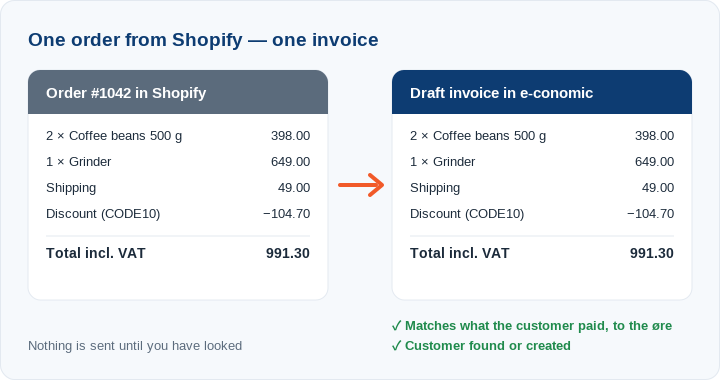
What goes from Shopify to e-conomic?
- Orders as draft invoices — or booked and sent to the customer, when you choose
- Customers found or created in e-conomic
- Product lines by item number, shipping and discounts
- VAT per country, One-Stop-Shop (OSS) included
- Refunds as credit notes
How to connect Shopify to e-conomic
Log in with e-conomic and connect Shopify: 2app makes an app for your store (you install it in one click), or you make it yourself in ten minutes. New and changed orders arrive within seconds. 2app only reads. Choose when an order comes along (paid or shipped, say), and look at the first invoices in e-conomic. Then you can switch on automatic sending — with a daily limit, and it stops itself if something goes wrong.
Example: order #1042 from Shopify as an invoice in e-conomic
A customer in Denmark pays DKK 851.10 including VAT and shipping in your Shopify shop. 2app makes this draft invoice in e-conomic, with amounts excluding VAT, as e-conomic shows them. A discount stands as list price and percentage, so the customer sees what was given.
LineQtyAmount excl. VATCoffee beans, 1 kg | 2 | 318.40
Coffee grinder (list price 359.20, discount 10%) | 1 | 323.28
Shipping | 1 | 39.20
VAT 25% | | 170.22
Total | | 851.10
The invoice's total is held against what the customer paid in Shopify: DKK 851.10. If it does not match to the øre, the invoice is not sent. The order stops and says why, so you fix the cause once, not the invoice every time.
VAT, OSS and sales outside the EU
The VAT zone is set for each order from the customer's billing country and the VAT Shopify actually charged. The customer's old zone in e-conomic is not used, as it may be out of date.
- An order with VAT: domestic, with the VAT the shop charged.
- A Danish order without VAT (VAT-exempt goods, say): domestic without VAT.
- A customer in another EU country without VAT: the EU zone.
- A customer outside the EU: export.
- If you use One-Stop-Shop (OSS), each EU country gets its own zone. 2app suggests the zones from your own e-conomic.
The VAT on each line comes from the product group in e-conomic. 2app checks that the product group fits the rate the item was sold at. An item sold without VAT in a product group with 25% stops the order, instead of giving an invoice that is too high.
Refunds, gift cards and fees
- Refunds become credit notes on the original invoice, in the same currency and at the same rate.
- A gift card used to pay is a payment, not a discount. The goods keep their price and VAT, and the gift card becomes a negative line without VAT on a VAT-free product number you choose.
- Shopify Markets: when a customer pays in euro in a shop in kroner, the invoice is in euro at Shopify's own rate — the amount Shopify Payments actually pays out. A gift card or refund in another currency than the invoice is never converted at a guessed rate; it stops and says why.
When an order cannot be sent
An order that lacks something stops: a product group with the wrong VAT, a gift card or a fee without a product number, an amount that does not match. Stopped orders are gathered in one list with the reason and a link to fix it, and the rest of the orders go on. With automatic sending, 2app sends the ready orders every 15 minutes, never more than your daily limit, and stops by itself after several failures in a row.
When the money arrives
The invoice is half of it; the money comes through your payment provider. With Shopify Payments to e-conomic, MobilePay to e-conomic, Klarna to e-conomic, each payment closes its invoice in e-conomic, and the provider's fees are booked on their own. Your debtors then come to zero by themselves.
You can connect Shopify and see the first invoices in a preview before anything is sent to e-conomic. The trial runs from the day you connect the shop, and you can stop at any time.
What it looks like in 2app


Examples from 2app with test data.
Questions about Shopify to e-conomic
How do Shopify orders get into e-conomic?
Each order becomes a draft invoice in e-conomic with the customer, the lines by product number, shipping, discount and VAT, checked to the øre against what the customer paid. You look through the first ones; after that 2app can book and send them itself, with a daily limit.
How are VAT and OSS handled?
VAT is set per country, One-Stop-Shop (OSS) too for sales to consumers in other EU countries. Refunds become credit notes in e-conomic.
What do I need to connect Shopify?
A login to e-conomic and access to your Shopify store. 2app makes an app for your store that you install in one click — or you make it yourselves in ten minutes. 2app only reads, and new and changed orders arrive within seconds.
How long does setup take?
Most are running the same day: log in with e-conomic, connect, and see the first entries before anything is sent. If you get stuck, we help — directly in your setup too, if you give us support access.
Is my data safe?
2app only gets read access to your webshop or payment provider. The keys are stored encrypted and never shown again, and you can delete them at the provider at any time to cut 2app off.
Can I cancel?
No lock-in. Stop after the trial if it is not a fit.
Self-service or assisted?
Self-service: each step in the dashboard shows where to find what it needs. If you would rather have help, call or write — we can set the app up with you.